For customers in Russia: MoneyCounter can be registered in the Unified Register of Russian Software (Ministry of Digital Development of Russia). If your procurement requires a register entry, contact us.
MoneyCounter Banknote counter for Windows
Counting cash, one denomination at a time.
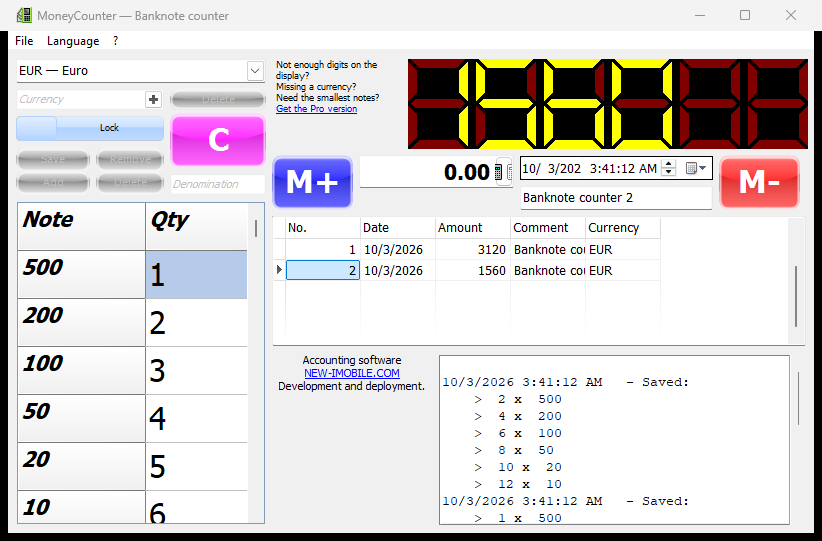
MoneyCounter is a small Windows program for counting banknotes. Choose one of 78 currencies, enter the number of notes of each denomination and read the total on a large seven-segment display. Every count can be saved to the history with the date, a comment and the full breakdown.
Direct link: MoneyCounter-2.0.0.0-Setup.msi (64-bit)
MoneyCounter by iMobile is a Windows 10/11 desktop program that totals cash by denomination. It ships with the banknotes of 78 currencies, keeps a history of counts in a local SQLite file, works offline and speaks 16 languages. The free edition has a 6-digit display and hides the smallest note of each currency; Pro ($19, one-time) shows every note, widens the display to 10 digits and lets you add your own currencies and denominations.
Made for the end of the cash day
Everything needed to count a till, an envelope or a safe — and nothing else.
78 currencies built in
Dollars, euros, yen, rupees, dong, rupiah, dirhams, pesos and more — each with the banknotes that are actually in circulation. The currency of your Windows region is selected on first start.
A total you can read from across the room
The sum is shown on a large seven-segment display and recalculated as you type the quantities.
History with the full breakdown
Press M+ and the count is stored with its date, currency, comment and the number of notes of every denomination.
16 interface languages
The program starts in the language of Windows; any other language is one click away in the menu. Currency names are shown in the chosen language too.
Your data stays on your computer
Counts are kept in a local file in your Windows profile. Backup and restore are in the File menu. No account is needed for the free edition.
Works offline
MoneyCounter needs the internet only to activate Pro. After that it checks the licence in the background and keeps working without a connection.
How it works
Four steps from a pile of notes to a saved total.
- 1
Choose the currency
Pick it from the list; its denominations appear in the table.
- 2
Enter the quantities
Type how many notes of each denomination you have.
- 3
Read the total
The display shows the sum as you type.
- 4
Save the count
Add a comment and press M+ — the count goes into the history.
Screenshot
One window: denominations on the left, the total, the history and the log on the right.
Free vs Pro
The free edition counts. Pro removes its limits for a one-time payment.
| Feature | Free | Pro |
|---|---|---|
| Built-in currencies | 78 | 78 |
| Display | 6 digits | 10 digits |
| Smallest banknote of a currency | ✗ | ✓ |
| Your own currencies and denominations | ✗ | ✓ |
| History, comments, backup | ✓ | ✓ |
| Price | Free | $19 once |
| Download | Buy Pro — $19 |
The free edition stays free: no trial, no expiry. Pro is a one-time purchase tied to your e-mail: enter the e-mail in the program, type the code from the letter — and Pro is on.
Setup & requirements
Windows 10 or 11, 64-bit. Administrator rights for the installation only.
- Download the installer — one MSI file, about 8 MB.
- Install and start — the program opens in the language of Windows with the currency of your region.
- Activate Pro (optional) — menu ? → Activation: your e-mail, the code from the letter, done.
MoneyCounter contacts only the iMobile account server, and only when Pro is activated or checked. Counts never leave your computer.
Count the cash, keep the record
Download MoneyCounter for free, or get Pro for every note and your own currencies.
$19 one-time · 10-digit display · every banknote · your own currencies