For customers in Russia: RDP-FIDO-GATE can be registered in the Unified Register of Russian Software (Ministry of Digital Development of Russia). If your procurement requires a register entry, contact us.
RDP-FIDO-GATE Phishing-resistant MFA for Windows Remote Desktop
Zero-trust RDP, gated by a hardware key.
A lightweight gateway that puts hardware FIDO2 two-factor authentication in front of Windows Remote Desktop. Users tap a security key before a session opens — there is no password left to steal.
Cloud pricing is set individually, depending on integrations with other systems, machine access rights by org structure, file exchange, connection statistics, dashboards and much more. Learn more →
Direct links: Download client · Download gate (host)
Security by design
Three guarantees that make a stolen password worthless.
Multi-factor by design
The RDP port opens only after a physical FIDO2 / WebAuthn key touch (its PIN or fingerprint can be required too) or, on a gate set up for teams without keys, after a one-time code from an authenticator app; Windows then still asks for its own password. A stolen or phished password is useless on its own.
Enforced by Windows itself
The gate is built entirely on native Windows security mechanisms — the Windows Firewall to open and close the port, the Windows WebAuthn API to check the key, and DPAPI to encrypt stored secrets. There is nothing to trust beyond the operating system.
Default-deny, time-boxed access
RDP port 3389 stays firewall-blocked and invisible to the internet. Only after a registered key proves possession does the gate open a narrow, single-IP hole for about 90 seconds — then it re-blocks the port and re-asserts the block every 30 seconds.
How it works
One key touch opens a single-IP firewall hole for about 90 seconds — then the port closes again.
FIDO Stream — when latency matters most
A second connection mode next to RDP: the desktop is streamed over UDP with hardware encoding — for games, CAD and video. The same key touch opens it; mstsc stays for everything else.
UDP and forward error correction
Video leaves the host in slices protected by Reed–Solomon FEC. A lost packet is rebuilt on arrival instead of being retransmitted a round-trip later, so a lossy Wi-Fi link does not turn into stutter. On a LAN, click-to-photon is 25–45 ms.
Hardware encode and decode
NVIDIA NVENC straight through the driver API, or any vendor's hardware encoder via Media Foundation (Quick Sync, AMF), with Microsoft's software H.264 as the fallback. The viewer decodes on the GPU — NVDEC on NVIDIA, DXVA on Intel and AMD — in H.264 or HEVC.
Built for games
Keyboard and mouse travel on a reliable channel as scan codes, so WASD works with any layout. Mouse capture (Ctrl+Alt+Home) sends relative motion for shooters; Ctrl+Alt+Enter toggles full screen. Audio flows both ways, your microphone included.
One balance slider
From “poor link” — lower resolution, HEVC, more FEC — to “weak PCs” — hardware-only, fastest preset, native resolution. Auto mode moves the balance toward whatever is the bottleneck right now.
The same key, the same gate
A stream ticket is issued only after the FIDO2 key confirms; session keys derive from ECDH bound to that ticket and every packet is AES-256-GCM. UDP 7441 opens only for your address and only for the session.
Nothing extra to install
The host agent lives inside the gate and the viewer inside the client, so both arrive with the installers and update themselves. The host usually dials the client: address candidates travel over the authenticated HTTPS channel and punch through most NATs without a third-party server.
Windows 10 1903 or newer on both sides. For the lowest latency the host needs a GPU with a hardware encoder (NVIDIA, Intel or AMD); HEVC needs a GPU decoder on the client, otherwise the stream falls back to H.264 automatically.
SSH behind the same key, with a console and an AI assistant
The gate on Linux closes the SSH port the same way it closes RDP. The SSH console tile opens a terminal that types saved passwords by itself, keeps frequent commands one click away and suggests the next ones: the AI assistant works with Claude or with a local model.
More about the SSH console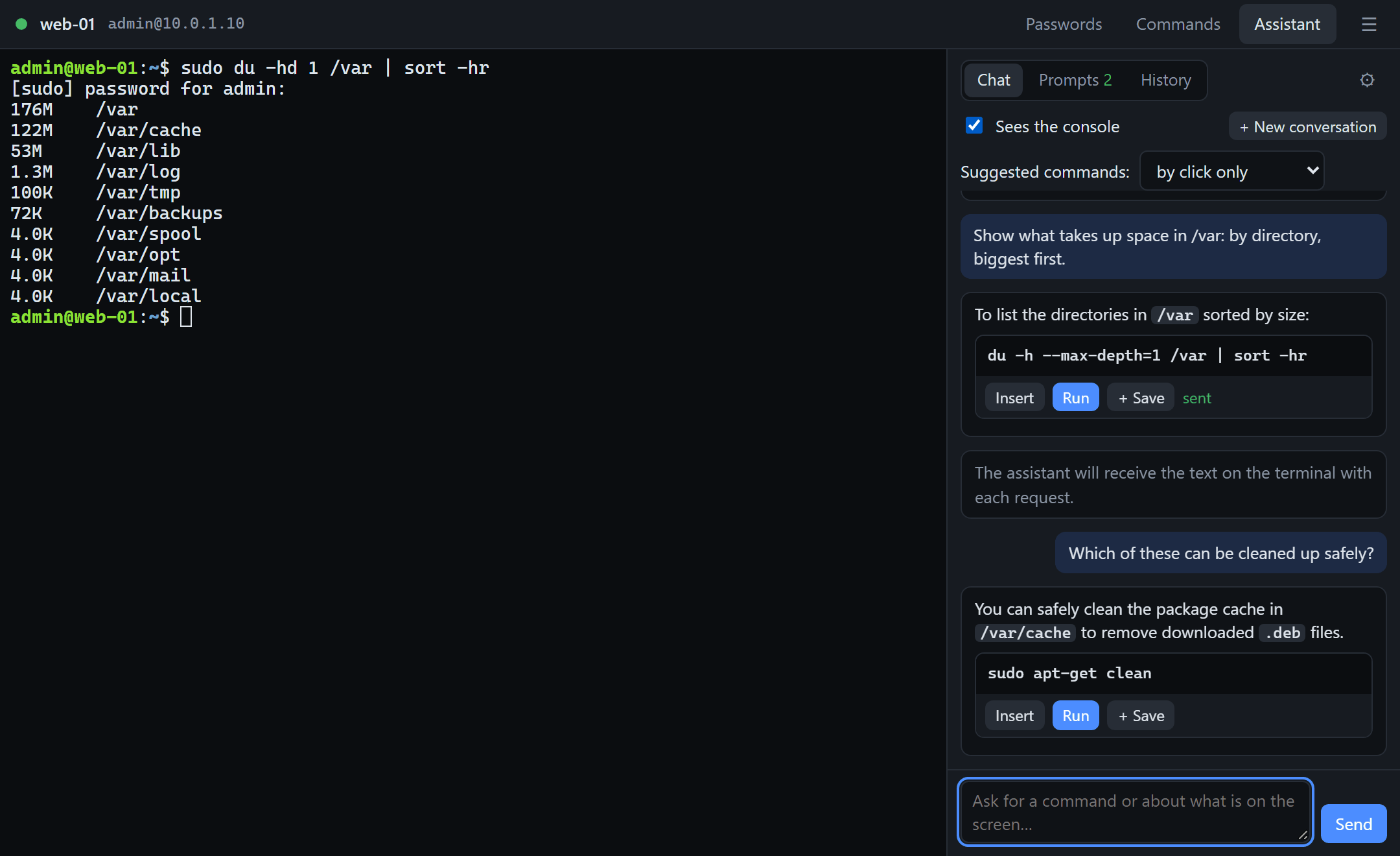
RDP FIDO for Android — open pre-beta
Same key, same gate — now from your phone. The app connects to Windows and Linux machines behind RDP-FIDO-GATE, and the key can be the phone itself. Nothing changes on the host.
The phone as the key
A P-256 key pair is created in the phone's secure hardware (StrongBox or TEE) and signs only after your fingerprint or screen lock. To the gate it is the same hardware key as Windows Hello. Security keys work too: a YubiKey or any FIDO2 key over NFC, or over USB through an OTG adapter.
FIDO Stream in your pocket
The same low-latency protocol: UDP with AES-256-GCM, Reed–Solomon loss recovery, H.264, HEVC or AV1 straight into the phone's hardware decoder, 90 and 120 Hz panels, audio both ways including the microphone.
Controls made for games
Bluetooth and USB gamepads appear on the host as an Xbox 360 controller with rumble coming back, an on-screen gamepad with a draggable layout, a Bluetooth mouse with pointer capture, a touchpad mode, a keyboard and a quick-keys bar.
RDP — for work
One key touch opens the RDP port for 90 seconds and the app hands the connection to your installed RDP client — exactly as the desktop client starts mstsc. Windows hosts and Linux hosts with xrdp alike.
Join the pre-beta
Before publishing on Google Play we are opening the build to everyone. So far the app has been verified on a single phone — we need other chips, other Android versions, NFC and USB keys, gamepads and 120 Hz screens. Install the APK, connect to your own gate and tell us what worked and what did not.
- Download the APK and allow installation from this source; Android 9 or later is required.
- On a host with gate 1.15 or later (Windows or Linux, the Free edition is enough) get a code: RdpFidoGate.exe code or sudo rdpfido-gate code.
- In the app: “+” → address and user name → “Enroll key” → phone, NFC or USB → the code. Then tap the tile → confirm → stream or RDP.
- Write to us through the contact form or to support@new-imobile.com: phone model, Android version, what worked, what did not, and the app log (the “Log” button).
The pre-beta is signed with our developer key; the Google Play build will be signed differently, so the pre-beta will have to be uninstalled before installing it. If you want a place in the closed Google Play test when it opens, include your Google account e-mail in the message.
Android 9 or later; a fingerprint or screen lock for the phone-as-key; NFC for NFC keys, OTG for USB keys. Host: RDP-FIDO-GATE 1.15 or later. The app is free and works with both the Free and the Pro gate.
Screenshots
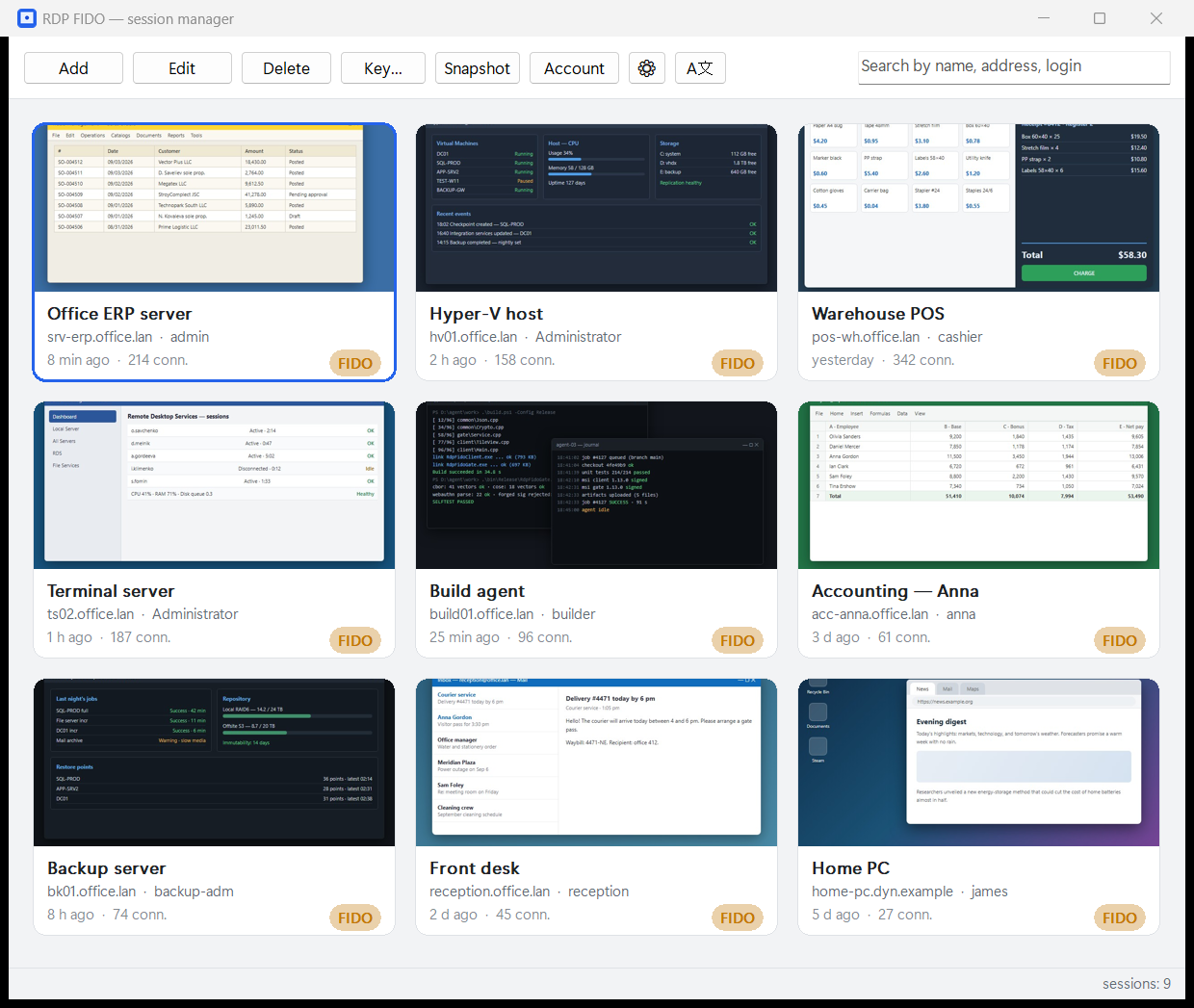
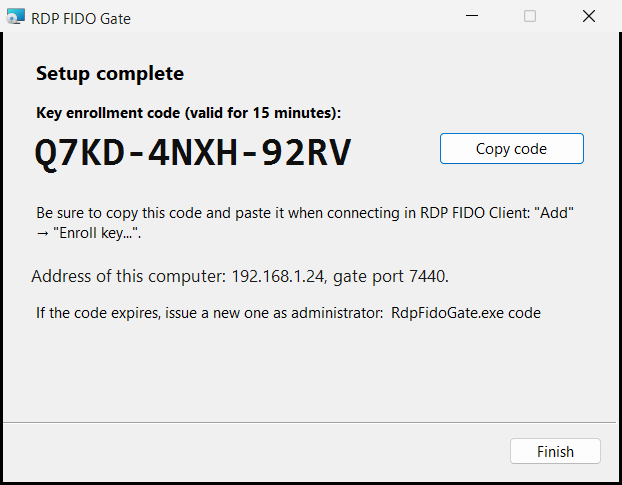
The session manager and the gate installer — this is the whole product.
Free vs Pro
Start free. Upgrade once for unlimited sessions and no ads.
| Feature | Free | Pro |
|---|---|---|
| Saved sessions | 10 | Unlimited |
| FIDO2 hardware-key gate | ✓ | ✓ |
| Windows Firewall enforcement | ✓ | ✓ |
| Ad tile | ✓ | ✗ |
| Activation | 14 days for free activation | — |
| Price | Free | $49 one-time |
| FIDO Stream low-latency mode | ✓ | ✓ |
| Buy Pro — $49 |
After activation you keep using it for free, within the Free plan's limits (up to 10 sessions).
Setup & requirements
No hosting — install the gate on the target PC and the client on yours. Ports: gate 7440/TCP, RDP 3389/TCP, FIDO Stream 7441/UDP.
- Host — run RdpFido-Setup.exe and choose “Host” (or RdpFidoGate-Setup.msi directly) as admin. The last page of the installer shows the host address, port 7440 and the one-time key enrollment code.
- Port forwarding (for internet access) — if the host is behind a router/NAT, forward 7440/TCP and 3389/TCP to the host's LAN IP — plus 7441/UDP if you want FIDO Stream from the internet. Reserve a static LAN IP; use DDNS if your public IP is dynamic.
- Client — run RdpFido-Setup.exe and choose “Client” (or RdpFidoClient-Setup.msi, no admin rights needed), activate by e-mail, add a session (host public IP/DDNS, gate port 7440, the one-time code), pick the protocol — RDP or FIDO Stream — and register your FIDO2 key.
- Connect — pick the session and touch the key — the gate opens 3389 for your IP for ~90s and mstsc connects.
⚠️ Without forwarding ports 7440 and 3389 on the router, internet access will not work. RDP is closed from outside until you confirm with the key.
RDP-FIDO-GATE for remote access in the US and worldwide
Exposed RDP is the most common way ransomware enters small businesses and MSP-managed networks. RDP-FIDO-GATE keeps port 3389 closed and opens it only after a hardware key touch — for one IP, for about 90 seconds.
Meets the MFA requirements of cyber insurers
Insurers, NIST SP 800-63 and CISA guidance ask for phishing-resistant MFA on remote access. A FIDO2 hardware key in front of RDP is exactly that — no SMS codes and no authenticator apps to phish.
Nothing to change on your servers
The gate installs from an MSI on the Windows host and uses the Windows Firewall, the Windows WebAuthn API and DPAPI. Your existing RDP hosts, domain and policies stay as they are.
One-time price in USD
The Free edition covers 10 saved sessions; Pro is $49 one-time with unlimited sessions and no ads — no per-user subscription for a small office or an MSP's tool kit.
Frequently asked questions
Which security keys work?
Any FIDO2 / WebAuthn hardware key that Windows recognises — YubiKey, Feitian, SoloKeys and similar. The key is registered once per session in the client; the gate checks it through the Windows WebAuthn API.
Does it work with Windows Server and cloud VMs?
The gate runs on any Windows host with Remote Desktop enabled — Windows 10/11 or Windows Server, on-premises or in a cloud VM. If the host sits behind a router, forward 7440/TCP and 3389/TCP to it.
Is RDP-FIDO-GATE enough for compliance?
It is a technical control: phishing-resistant MFA plus a default-deny firewall in front of remote access, which is what HIPAA, PCI DSS and cyber-insurance questionnaires ask about. It is not legal advice — validate your specific obligations.
How much does it cost?
Free: FIDO2 gate, firewall enforcement, up to 10 saved sessions, an ad tile, activation within 14 days. Pro: $49 one-time, unlimited sessions, no ads. Regional prices are shown at checkout.
Guides
How-to articles for this product.
- Protect Windows RDP with a FIDO2 security key — without Azure or an RD Gateway
- Two-factor RDP with an authenticator app (TOTP) on standalone Windows
- Stop exposing port 3389: open RDP on demand, for one IP only
- RDP MFA options compared: VPN, RD Gateway, logon agents and port gating
- MFA for RDP on a cyber-insurance questionnaire: what to answer and how to get there
- Keep the SSH port closed until you touch a FIDO2 key (Linux server or VPS)
- FIDO2 for SSH compared: ed25519-sk keys, a VPN, port knocking and a key-gated port
- Hide SSH from scanners: another port, fail2ban, port knocking — and what actually works
- An SSH console with an AI assistant on your own model: Ollama, LM Studio or Claude
- Stop retyping the sudo password: an SSH console for Windows that answers password prompts
Documentation
PDF documents for RDP-FIDO-GATE: description, installation, user guide, support and security. The documents are in English.
Документация на русском языке (оформление по ГОСТ 19)
- Описание функциональных характеристикPDF · 192 KB
- Руководство по установке и администрированиюPDF · 204 KB
- Руководство пользователяPDF · 228 KB
- Описание процессов, обеспечивающих поддержание жизненного цикла программыPDF · 175 KB
- Спецификация поставки и сведения о сторонних компонентахPDF · 181 KB
- Сведения о соответствии требованиям законодательства Российской ФедерацииPDF · 187 KB
English
Lock down Remote Desktop today
Download the gate and client for free, or unlock everything with Pro.
$49 one-time · unlimited sessions · no ads